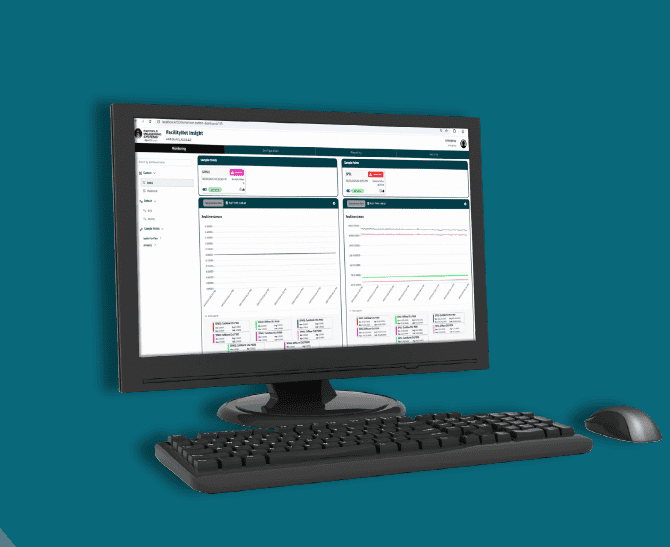
FacilityNet Insight™, the contamination-monitoring software platform from Particle Measuring Systems, is now at Version 1.1. The release is built for electronics manufacturing teams who need faster evidence across tools, areas, and facility systems.
Three needs shaped this newest version: more history, remote access, and greater connectivity. Teams wanted to see more history, moving beyond short snapshots to investigate particle behavior across longer time windows; reach data remotely, reviewing monitoring evidence from another authorized workstation on the facility network; and connect operations, exchanging selected monitoring data with compatible BMS, SCADA systems, and manufacturing systems. Together, these capabilities extend contamination monitoring from individual sample points to broader facility context.
Built on a proven Version 1.0 foundation
Version 1.1 adds to a platform the installed base already runs on today. Version 1.0 covers four core areas:
- Instruments and sample points: configure particle and analog sample points online, offline, serial, or multicast.
- Dashboards and realtime views: a default grid, custom multitrend and dual-view dashboards, plus plots and tabular views.
- Alarm limits and handling: particle, analog, calibration, and multi-channel limits, with priorities and acknowledgment.
- Batch and audit reporting: generate, search, and download batch and audit reports, plus historical data export.
The platform is secure by design, with user accounts, five role types and licensed system sizing.
Version 1.0 already covers the full contamination-monitoring cycle end to end:
- Configure instruments and sample points.
- Derive virtual points and statistics.
- Monitor through grid and trend dashboards.
- Respond with alarm limits and acknowledgment.
- Report with batch and audit reports.
What Version 1.1 adds
Four enhancements strengthen contamination monitoring without changing the core operating model.
Extended historical analysis (12 months)
Review particle monitoring data across longer time windows displayed as either a trend graph or a table of data points. The goal is to turn a particle-monitoring question into a repeatable investigation workflow:
- Select the sample point and channels.
- Choose a preset or custom timeframe.
- Review the trend and the table.
- Zoom and page through time.
- Return to real time.
Remote network access
Remote access brings monitoring evidence to the engineer. PMS instruments monitor particles at the tool or area, and a central monitoring server holds the application and data. An authorized path on the facility network carries browser-based monitoring views to the engineer’s workstation. The same sample-point view can be opened from a second authorized workstation, with consistent access to current and historical evidence.
Connected facility monitoring with OPC UA
OPC UA connects contamination monitoring to the facility ecosystem. FacilityNet Insight takes particle data from PMS sensors and selected external data, then monitors, visualizes, and shares it. Selected data can flow to BMS/SCADA system for facility monitoring context and/or to manufacturing systems for approved operational data use. From there it can reach a historian or data layer for compatible enterprise consumption.
The positioning is deliberately focused on standards-based data exchange rather than replacing Manufacturing Execution System (MES) or yield-management platforms.
Configurable decimal precision
Modern status views and configurable data precision make daily contamination monitoring more efficient, helping users quickly assess conditions, view data at the appropriate precision, and move seamlessly into historical analysis:
- Status at a glance: orient quickly across monitored tools and areas.
- Right precision: display values at the precision the workflow requires.
- One investigation path: move from current status to history without changing tools.
Following one contamination question end to end
The best way to see Version 1.1 is as a connected investigation story, not a feature checklist.
Consider a contamination engineer who sees a particle-count change near a production tool. They need to determine when it began, review the evidence remotely, and make selected data available to the facility system. The path looks like this:
- Orient: check the current sample-point status.
- Investigate: extend the historical timeframe.
- Focus: zoom into the change window.
- Connect: review remote and OPC UA access.
- Communicate: summarize the operational finding.
Engineers can select the sample point, channel, and timeframe. They can then switch between trend and table, zoom into the event, and page through historical data. The outcome is an investigation focused on the relevant time window.
The same contamination evidence reaches the people and systems that need it. An authorized engineer opens it from a remote workstation. While selected, approved data items flow through OPC UA to facility systems such as BMS, SCADA system, or a historian. Monitoring evidence becomes accessible where decisions are made and can join the customer’s facility data stack.
One operating rhythm
Version 1.1 links visibility, analysis, access, and connectivity into a simpler contamination-control workflow:
- Monitor: review current conditions.
- Detect: notice a change or alarm.
- Analyze: extend history and isolate the timeframe.
- Collaborate: open the view remotely.
- Integrate: share selected data through OPC UA.
The value is faster movement from observation to informed action.
Subscription terms that fit planning cycles
Customer feedback on subscription-based software consistently asked for longer commitment options. FacilityNet Insight now offers three terms. An active subscription includes access to applicable software releases, feature improvements and product support. OPC UA connectivity is available as an optional licensed add-on.
PakarPBN
A Private Blog Network (PBN) is a collection of websites that are controlled by a single individual or organization and used primarily to build backlinks to a “money site” in order to influence its ranking in search engines such as Google. The core idea behind a PBN is based on the importance of backlinks in Google’s ranking algorithm. Since Google views backlinks as signals of authority and trust, some website owners attempt to artificially create these signals through a controlled network of sites.
In a typical PBN setup, the owner acquires expired or aged domains that already have existing authority, backlinks, and history. These domains are rebuilt with new content and hosted separately, often using different IP addresses, hosting providers, themes, and ownership details to make them appear unrelated. Within the content published on these sites, links are strategically placed that point to the main website the owner wants to rank higher. By doing this, the owner attempts to pass link equity (also known as “link juice”) from the PBN sites to the target website.
The purpose of a PBN is to give the impression that the target website is naturally earning links from multiple independent sources. If done effectively, this can temporarily improve keyword rankings, increase organic visibility, and drive more traffic from search results.